
Overview Is it worth it? FAQ
What 1px-ai Is and What It Does?
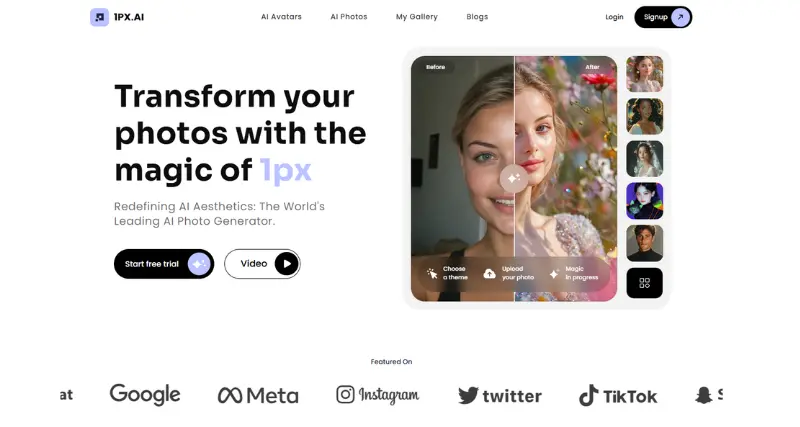
1px-ai is a state-of-the-art AI-powered design platform built for creative pros, companies, and hobbyists who want to speed up their design work. This tool uses AI algorithms to create top-notch designs, prototypes, and visual elements with little manual work. Whether you’re making graphic designs, tweaking layouts, or brainstorming creative ideas, 1px-ai lets you do advanced tasks.
At its heart 1px-ai makes complex design tasks easier by getting what its users need through easy-to-use controls and tips. It closes the gap between creativity and tech know-how allowing anyone – from newbies to pro designers – to make designs that look professional.
Key Features
AI-Powered Automation: The system handles routine design jobs freeing users to be creative while the AI takes care of layout tweaks, color coordination, and other tasks.
Template Collection: A huge set of ready-made templates designed for different purposes, like social media posts, web pages, brand materials, and slide decks.
Adjustable Elements: People can change every part of their designs, including text styles, forms, and color schemes all while getting smart recommendations.
Team Tools: Built-in options to share and work together make it simple for groups to collaborate on projects in real time giving input and watching changes happen live.
Works on Many Devices: You can use it on the web or add it to browsers like Chrome. You can also get apps for iPhones to design while you’re out and about.
How It Works
1px-ai makes it simple for users to start creating right away:
Login and Select a Canvas: After you log in to the platform, you can pick from various templates or make your own canvas.
Input Design Preferences: You can select themes, styles, and specific design goals.
AI Suggestions and Edits: The AI creates designs or prototypes based on your input giving you options to customize.
Export or Share: You can download finished designs in common formats or share them with team members right from the platform.
Use Case
1px-ai fits these needs:
Making pro marketing stuff like banners, flyers, and social media posts.
Creating website mockups or wireframes to develop.
Designing logos and brand elements for new or small companies.
Coming up with product packaging ideas fast.
Best For
1px-ai works great for:
Freelance designers and creative pros.
Small and mid-sized businesses that need promo or brand materials.
Marketing teams who want quick design fixes.
Teachers and students checking out graphic design.
People with little design know-how looking for an easy tool to use.
Versions/Models
1px-ai offers several versions to meet different user needs:
Free Version: Gives you basic design tools and some templates to choose from.
Pro Version: You pay a subscription to unlock all templates, get advanced tools, and work with others.
Enterprise Version: Made for companies, this plan has tools to manage teams, support when you need it, and better ways for people to work together.
Pros
Easy to use even if you’ve never designed before.
Its AI features help you finish work much faster.
Lots of templates and images to kick off your project.
Easy to work with others and get feedback.
The team often makes it better based on what users say.
Cons
Not many advanced tools for pro designers who want full control.
Some templates might look too basic for specific design needs.
You need to pay to use the best features.
Benefits
Cuts down the time you spend on design tasks.
Sparks new ideas with AI-suggested designs.
Easy to learn making it accessible to everyone.
Boosts team output with tools for real-time teamwork.
Browser/Platform Compatibility
Web-Based Access: Works on most new browsers.
Browser Extension: You can add it to Chrome to use it .
iOS App: You can get a mobile app to create and edit while you’re out and about.
Available Pricing
Free Plan: $0, gives you basic access and a limited number of templates.
Pro Plan: Starts at $10/month, lets you use all tools and templates.
Enterprise Plan: Price varies based on what your company needs, comes with advanced features.
Is It Worth It?
If you want to make your design process smoother get more done, and use tools that are easy to work with, you should think about trying 1px-ai. You can start with the free version if you’re new to this. If you need more, the Pro and Enterprise plans have lots of features for experts and businesses. It might not do everything that top-end software can do, but it’s great for most design jobs. This is true if you’re part of a small team or work on your own.
1. Is 1px-ai suitable for beginners?
Yes, beginners can use the interface.
No way. AI boosts creativity by taking care of repetitive work allowing users to concentrate on their creative ideas.
3. Can I collaborate with a team?
Yes, the Pro and Enterprise versions offer tools for team collaboration.
No, you need an internet connection to use 1px-ai because it's a web-based tool.
Yes paid users can get help through live chat and email from dedicated support staff