Overview Is it worth it? FAQ
What Andi Is and What It Does?
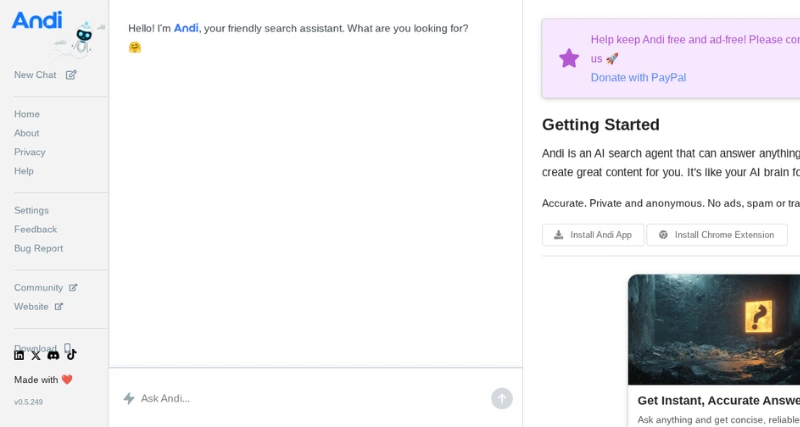
At its heart, Andi works as an AI-driven assistant designed to change how people search online and manage information. Unlike usual search engines, Andi uses advanced natural language processing and machine learning tools to get what you’re asking. It gives direct tailored answers that match what you’re looking for. It also connects you to the right resources and gets rid of junk like ads or other things that waste your time.
Standout Features/Capabilities
Contextual AI Search: Andi figures out what you mean when you ask something by focusing on your intent and understanding the details of your queries.
Ad-Free Experience: Search results come without any distracting ads. You get clear and focused answers instead of the clutter found on other search platforms.
Visual Summaries: Andi creates clear and appealing summaries to help people understand tough topics or large documents.
Handles Several Tasks Together: You can do many things at once, like reviewing suggested fixes while writing a reply in the tool.
Focuses on Privacy: The tool protects user privacy by collecting as little data as possible and keeping web sessions secure.
How It Works
Using Andi feels as simple as chatting with a personal assistant. You just type or say what you need, and Andi uses AI tools to deliver clear answers along with visual details. You can add it to your daily routine through browser plugins or an app on your phone. A short demo video helps people understand how it works and learn about its extra tools.
Use Case
Carrying out deep research to tackle academic or work-related needs
Managing project information in an organized way
Resolving coding problems or technical questions fast
Making everyday tasks easier like organizing schedules or getting reliable local details.
Best For
Students or researchers who need accurate answers without ads
Professionals looking to use tools that simplify multitasking
People interested in trying modern tech innovations
Versions/Models
Andi comes as a web app, with support available as a Chrome browser extension and a special iOS application.
Pros
Ease of Use: The simple and user-friendly setup allows people to use it even without knowing anything about graphic design.
Time-Saving: Built-in automation removes the need for spending hours doing tedious work like image editing or creating content.
Versatility: Works well for different kinds of users, from those making social media posts to marketing professionals or just everyday individuals.
High-Quality Output: Delivers polished visuals that look professional and are ready to share or publish.
Multiple Platform Support: Works on web browsers, comes as a Chrome extension, and is accessible on iOS devices.
Cons
Lacks Precision in Adjustments: Results made by AI may not match the detailed changes that experienced designers can achieve through manual work.
Requires Payment for Advanced Tools: Accessing high-end templates or extra features needs a paid upgrade.
Benefits
Increases output by managing repetitive editing tasks .
Maintains consistent standards to deliver polished content for personal or work purposes.
Puts creative tools into the hands of everyday users making content creation more accessible to all.
Browser/Platform Compatibility
Airbrush adapts well to users’ mobile or desktop demands. You can get to it easily on different platforms such as:
Web-Based Platform: Works on all popular internet browsers.
Chrome Extension: Lets you integrate into your everyday browsing.
iOS App: Designed for Apple devices making it convenient to use on phones and tablets.
Available Pricing (Free Vs Paid)
Airbrush has a Free Plan that includes basic tools making it great to explore or use . The Premium Plan costs $9.00 per month and gives you extra perks like better resolution exclusive templates advanced editing tools, and faster support. Pricing might change depending on what users need.
Disclaimer: Pricing details might change over time. To get the latest and most accurate pricing information, visit the official AirBrush AI website.
Is It Worth It?
Airbrush serves as an effective and low-cost tool to create modern visual content. It might not replace skilled manual editing on some top-tier projects, but it saves a lot of time. Its ease of use and flexibility make it a smart choice for many.
Yes, you can cancel your Airbrush subscription at any time without any extra fees.
2. What does Andi do to protect privacy?
Andi keeps information safe by using encrypted connections and cutting back on data tracking.
You need the internet to use most features like searches and updates in real-time.
.
4. Is there a trial period for the paid version?
Yes, Andi has a short trial to let users try out the paid features before deciding.