

What is Evlat?
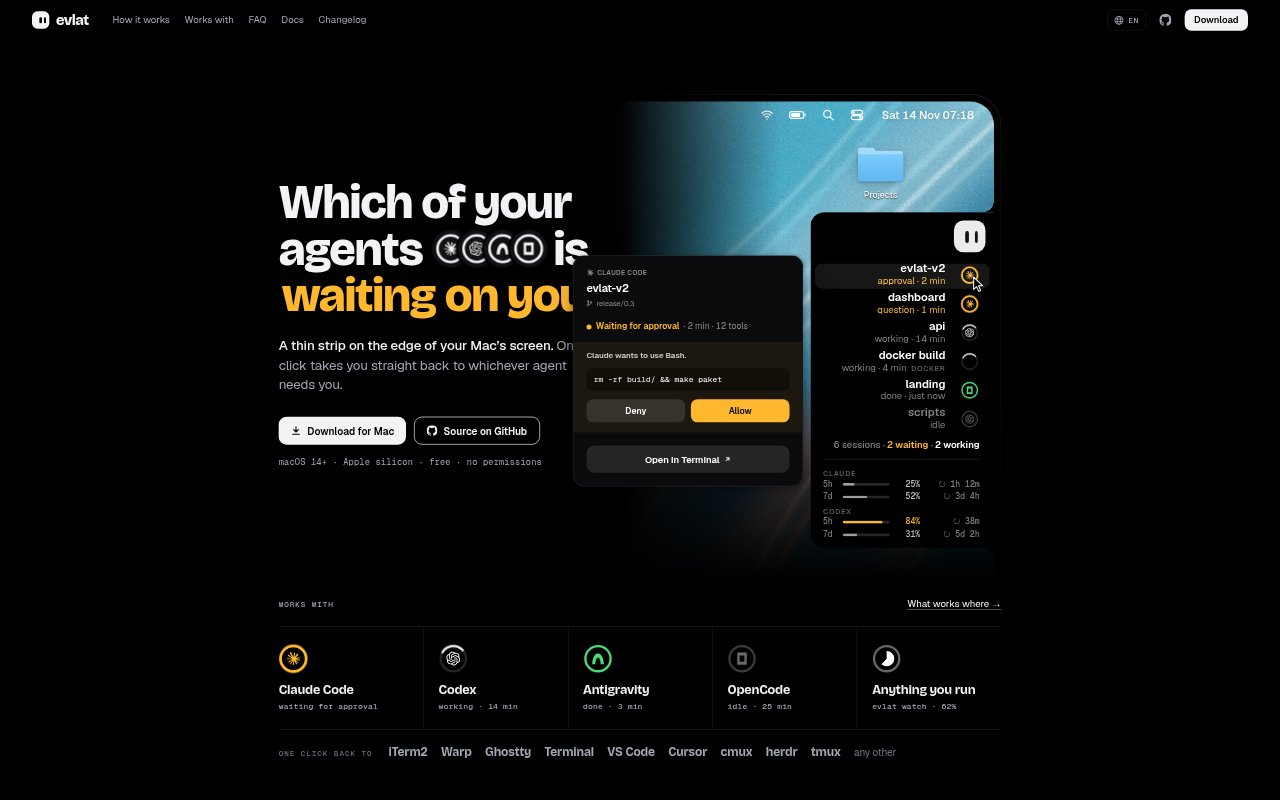
Evlat is a free Mac app for keeping track of coding agents and other long-running work. It displays sessions on a narrow strip at the edge of the screen, with status changes for work in progress, completed tasks and requests for input. It supports Claude Code, Codex, Antigravity and OpenCode, as well as commands and scripts you choose to monitor. Evlat requires macOS 14 or later on Apple silicon; it has no account or telemetry.
Evlat Features:
Edge Session Strip: Each tracked session gets a ring on the screen-edge strip, with motion and colour indicating whether it is working, waiting or finished.
Agent Request Details: Hovering over a session reveals what it is doing and for how long, while its card can show the command or question that needs attention.
Inline Responses: For Claude Code and OpenCode, the session card offers buttons to respond to requests without first switching to the agent’s terminal.
Command Tracking: Run a command with evlat watch to show a status ring until it exits, including a green state for success or a red state with its exit code for failure.
Script Progress Signals: Scripts can use evlat signal to report progress or set a waiting, done or failed state, and their rows expire automatically.
SSH Server Monitoring: Evlat can show jobs and supported agent sessions from machines reached over SSH, tagging each row with its machine name and dimming rows if the connection drops.
Mascot Chat: Open a chat balloon from the mascot or with a keyboard shortcut; it runs on the Claude Code installation already on the Mac and accepts files dropped onto the mascot.
Evlat Benefits:
Fewer Context Switches: A glance at the strip can show which session needs attention, so you can avoid checking each terminal one by one.
Timely Responses: Visible waiting states help you catch agent questions or approval requests before they hold up other work.
Clear Completion Status: Success and failure states make it easier to tell whether a background task finished cleanly without watching its terminal.
Remote Awareness: Machine labels and connection status help you distinguish remote work from local sessions and avoid relying on stale updates.
Local Privacy: With no account or telemetry and session communication kept on the Mac, you can monitor work without sending usage data to an Evlat service.
Use Cases:
Agent Approvals: Keep Claude Code or Codex visible while working in another app, then return when a session is waiting for approval or a response.
Long Test Runs: Start an end-to-end test suite with evlat watch and continue other tasks until the strip shows whether the command passed or failed.
Build Monitoring: Track a lengthy image build or deployment without keeping its terminal window in the foreground.
Remote Training Jobs: Monitor a training run on a GPU server over SSH and see its machine name and connection state alongside local sessions.
Script Status Updates: Add progress or waiting signals to a script that knows its own stages, so its status is visible while it runs.