

What is gtree?
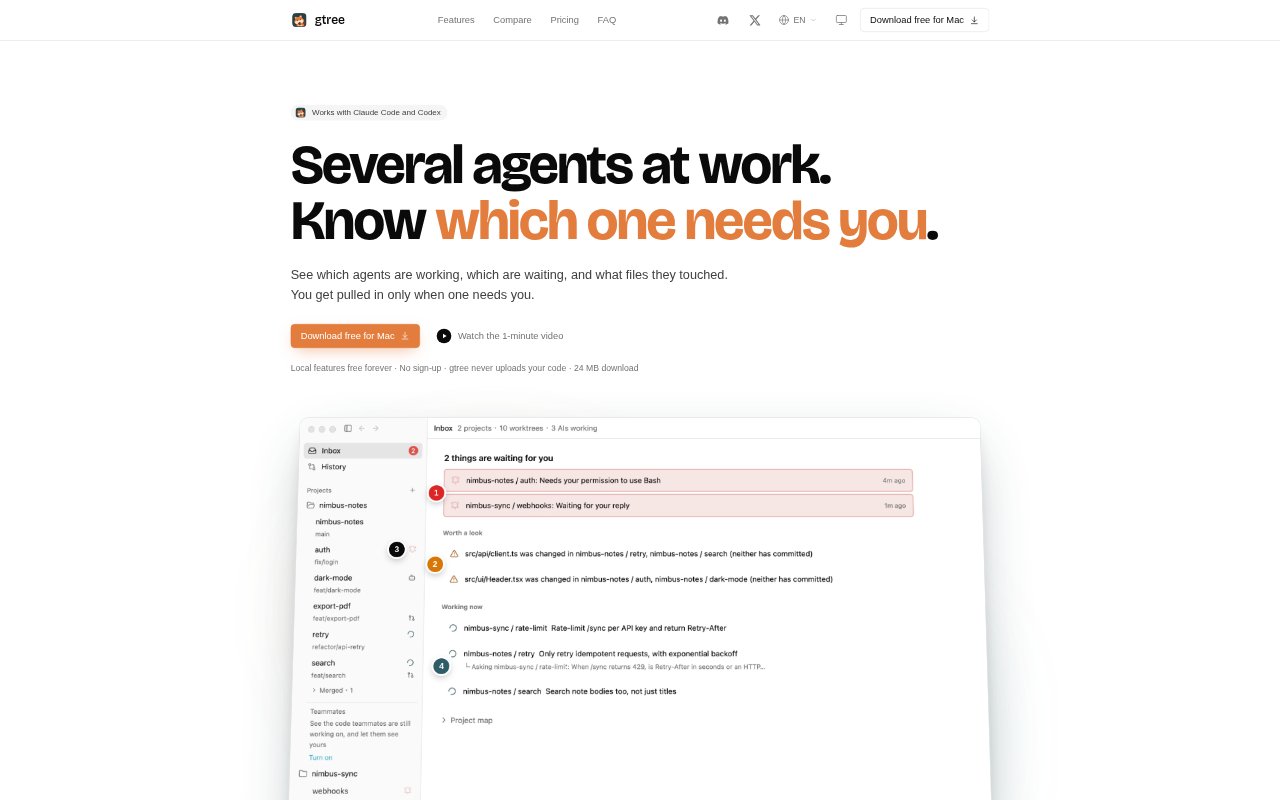
gtree is a native desktop app for people who build software with Claude Code or Codex. It brings agent sessions across projects and worktrees into one place, showing what is active, waiting for input, or changing files. The app also includes a Git client for everyday branch and merge-request work. It runs locally on Apple Silicon Macs, does not upload code, and can be used without signing up.
gtree Features:
Agent Status: See which agents are working or waiting, which files they have touched, and which worktrees have overlapping file changes.
Shared File Awareness: When agents in separate worktrees touch the same file, gtree flags the overlap so you can compare changes.
Central Inbox: Permission requests and questions from agents appear in one Inbox, with notifications that take you directly to the relevant session.
Turn Restore: Each agent turn is kept, and you can restore a previous state with one click if a turn causes a problem.
Cross-Project Questions: An agent can ask another project’s agent about an API without interrupting that agent’s current work; this is currently Claude Code only.
Git Client: Push, pull, rebase, open pull or merge requests, browse history, and compare branches or commits in the same app.
iOS Simulator: Watch an agent test an iOS app in the Simulator, tap by text, and take over when needed; this requires Xcode.
gtree Benefits:
Fewer Interruptions: You can focus on your own work instead of repeatedly checking sessions, because gtree brings requests to you when an agent needs input.
Safer Collaboration: Early visibility into shared-file changes helps you address conflicts before agents’ work collides in the same part of a project.
Easier Recovery: Keeping turns available makes it simpler to recover from an unhelpful agent change without manually reconstructing the earlier state.
Less Window Switching: Keeping agent activity and common Git tasks together reduces the need to move between separate terminals and repository tools.
Local Code Control: Because code stays on your Mac, you can coordinate AI coding work without sending your repositories to gtree.
Use Cases:
Parallel Coding: Run Claude Code or Codex in multiple worktrees and check which sessions are active, waiting, or changing files.
Shared File Changes: Use the overlap indicator to review when two agents working in separate worktrees are changing the same file.
Permission Reviews: Step away while agents work across projects, then use the Inbox to handle permission requests or answer questions that need your attention.
Agent Recovery: Restore an earlier turn when an agent’s latest work breaks something or takes a project in the wrong direction.
iOS App Testing: Have an agent test an iOS app in the Simulator while you observe its actions and take control when necessary.
Branch Maintenance: Push a branch, rebase it, inspect its history, or open a merge request while working alongside your coding agents.