

What is Instant?
Instant is a private file search app for Mac that finds documents, photos, and other files from a description of what they contain, rather than just a title or keyword. It is designed for people who remember a file’s subject or a detail inside it but not its name or location. The app runs locally on Apple silicon Macs with macOS 15 or later, and is free to use.
Instant Features:
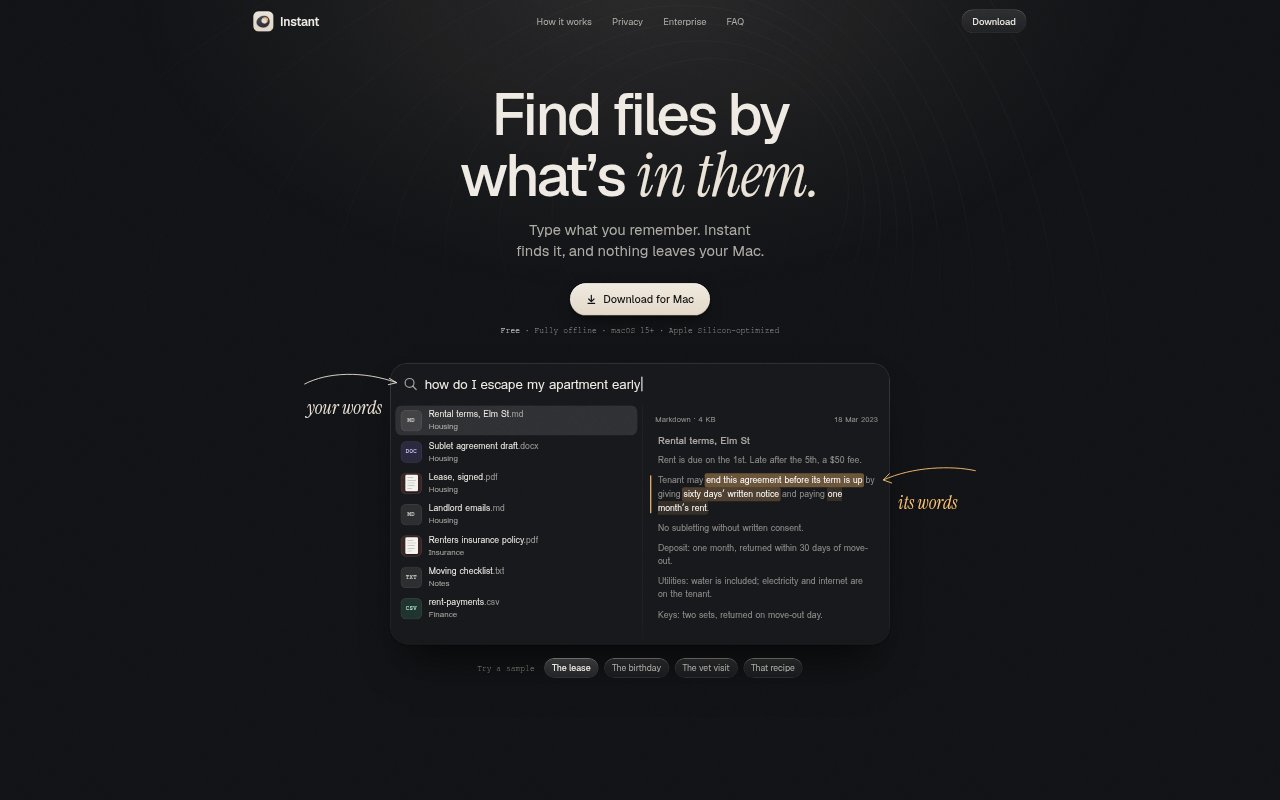
Meaning-Based Search: Describe a file in your own words, including a question or remembered detail, and Instant searches for relevant content across the folders you choose.
Relevant Highlights: Search results highlight the passage that matches your description, helping you check why a document, note, or other file was found.
Document Support: Instant reads PDFs, scanned PDFs, DOCX, RTF, ODT, Markdown, text files, and source code, including scans without a text layer.
Image Support: The app searches photos and supports HEIC, JPEG, PNG, WebP, GIF, and TIFF image files.
Keyboard Search: Press Option-Space over any app to open search, or choose another keyboard shortcut that suits your setup.
Folder Indexing: Choose which folders Instant searches; the first index takes minutes for an average document collection or hours for a large photo library, and later indexing covers changed files.
Instant Benefits:
Search From Memory: You can start with an approximate description instead of recalling an exact filename, keyword, or folder path.
Less File Hunting: Finding a relevant passage inside a document can reduce the need to open files one by one to check their contents.
Private Searches: Because files and searches stay on your Mac and no account or cloud service is involved, personal documents remain local during search.
Use Your Own Folders: Selecting the folders to search lets you include files beyond the Photos library without moving them into a separate service.
No Purchase Cost: The app is free, so you can try searching your own files without paying for a plan.
Use Cases:
Find Contract Terms: Search for a rental clause by describing the situation, such as how to end an apartment lease early, then check the highlighted notice requirement.
Recover Gift Ideas: Look up a note about a birthday present using a description of the occasion or item, even if you do not remember the note’s title.
Check Care Instructions: Find a detail in a vet clinic PDF by describing the advice you remember, such as a pet’s diet or feeding schedule.
Locate Recipe Notes: Search recipe files for a memorable ingredient or instruction, such as a pasta recipe that calls for a large amount of garlic.
Search Scanned Papers: Look for information in scanned PDFs and image files by describing their contents, including documents that lack a text layer.