

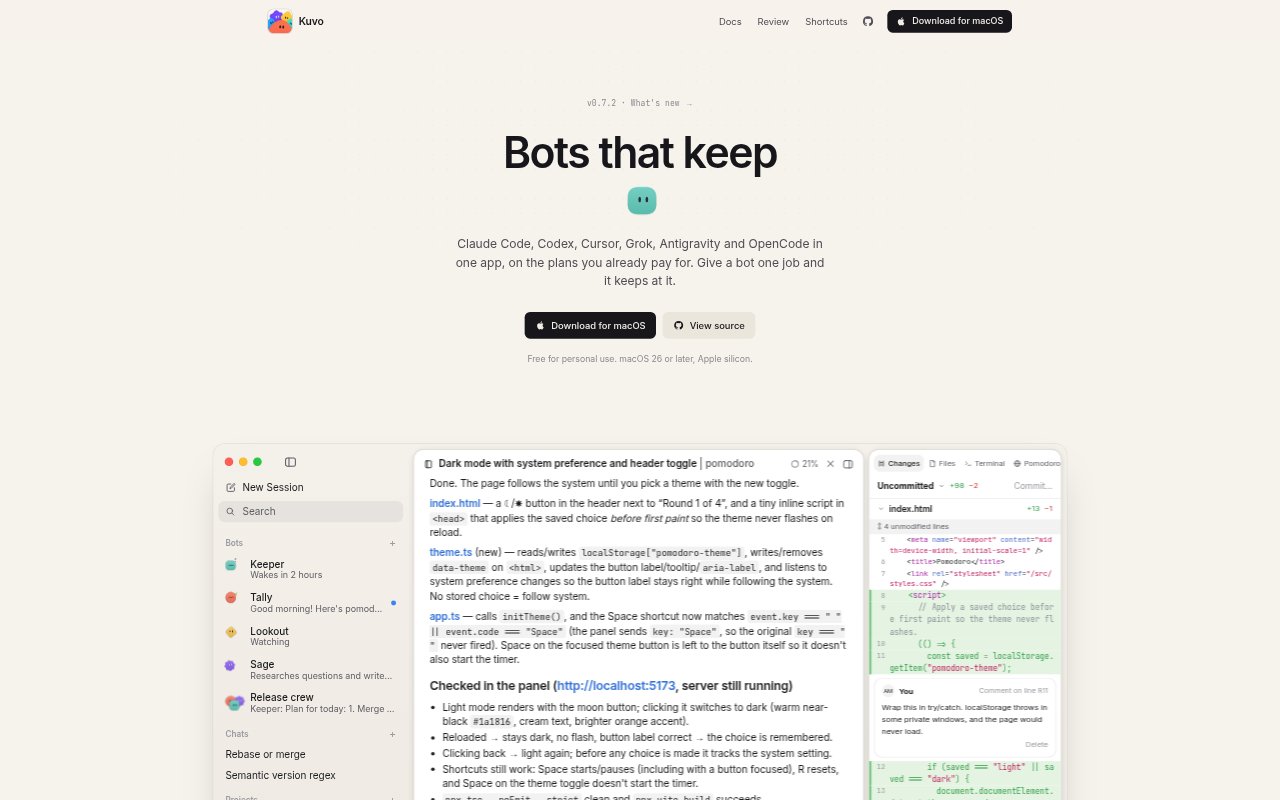
What is Kuvo Code?
Kuvo Code is a macOS app for running coding agents and AI bots on your computers, with support for multiple coding agents and models. You can give a bot a specific job, let it retain what it learns and have it resume on a schedule. The app is for developers and teams who want ongoing automated work while keeping a view of what agents say and change. It requires macOS 26 or later and Apple silicon, and is free for personal use.
Kuvo Code Features:
Agent Access: Use Claude Code, Codex, Cursor, Grok, Antigravity and OpenCode in one app with plans you already pay for.
Bots With Jobs: Give each bot a name and a job; it remembers what it learns and can continue that work later.
Scheduled Wakeups: Bots can arrange their own wake-ups, such as a weekday morning check, and carry on from where they stopped.
Change Watchers: Set a bot to check a page or build on a schedule without using its model, and wake it when something changes.
Group Coordination: Bring bots into a group chat to discuss a task, assign work and report back through separate conversations.
Work Review: See agent messages, commands, project changes and opened pages in one window, with changed lines and image comparisons available for review.
Bot Personalization: Start with a ready-made bot or choose its appearance and conversational style, then edit its job as needed.
Kuvo Code Benefits:
Less Repetition: Bots can pick up recurring work where they left off, reducing the need to restate the task each time.
Fewer Interruptions: Scheduled checks can surface a change or failure when it matters instead of requiring constant manual monitoring.
Clearer Ownership: Separate bots with defined jobs make it easier to see who is responsible for each part of ongoing work.
Review Confidence: Seeing what an agent ran and changed makes its work easier to inspect before deciding what to keep.
Team Follow-Through: Group task discussions and reports help people track delegated work without piecing together separate updates.
Use Cases:
Build Monitoring: Have a bot build a project and run its tests regularly, then investigate failures on a separate branch and report what broke.
Release Tracking: Watch a software project's releases and get notified when a new version appears.
Daily Standups: Ask a bot for a morning summary of what changed in a project and which tasks still need attention.
Release Coordination: Use a group of bots to plan a release, divide steps such as build fixes and notes, and collect their reports.
Code Change Review: Inspect an agent's project edits, compare changed lines and images, and comment on specific lines before accepting the work.