

What is Tellcut?
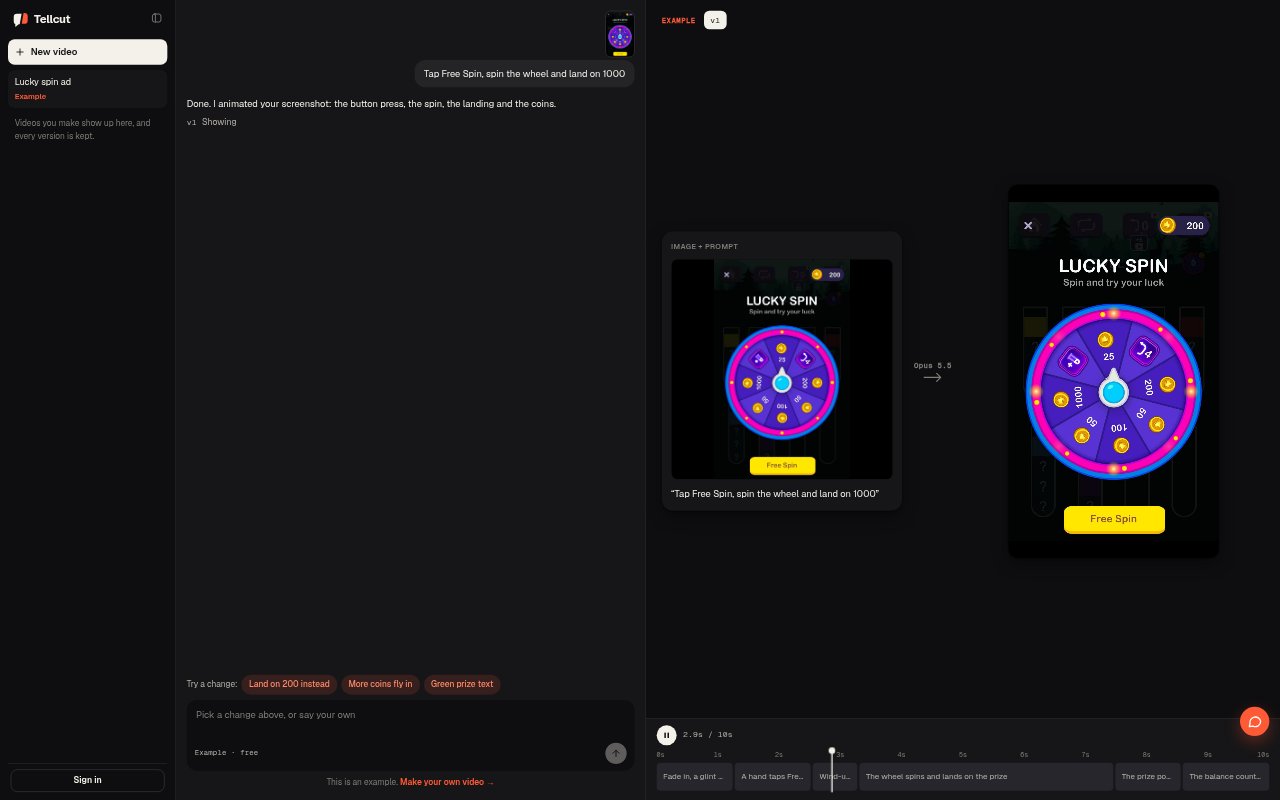
Tellcut is a browser-based AI motion graphics studio that turns written prompts and screenshots into short animated videos. It uses Claude Opus 5.5 to plan scenes and build animations, then lets you refine individual shots through conversation. It is suited to marketers, creators and product teams who want to make product demos, animated charts or marketing videos without moving between separate generation, editing and export tools. Finished videos can be downloaded as 1080p MP4s.
Tellcut Features:
Text and Screenshot Inputs: Describe a video in a prompt or upload screenshots, product photos or posters and explain what should move.
Claude Scene Planning: Claude plans the shots and builds an animation from your brief or images in the Studio workspace.
Aspect Ratios and Length: Choose 16:9, 9:16 or 1:1 framing and set a duration of up to 30 seconds.
Templates and Effects: Start with ready-made motion graphics templates or preview effects and apply one to a video.
Chat-Based Revisions: Request changes in chat or select a shot to focus an edit, including revisions to image-based animations.
Preview and Versions: Play the animation, scrub its timeline, inspect how scenes move and compare saved versions after edits.
MP4 Export: Download finished videos as 1080p MP4 files, with no watermark and commercial use included in the listed plans.
Tellcut Benefits:
Fewer Tool Switches: Planning, previewing, revisions and exporting happen in one workspace, so a short video can move from idea to delivery in a single workflow.
More Focused Revisions: Selecting a shot or describing a change lets you direct attention to a specific part of the animation instead of rebuilding the whole concept.
Clearer Review: Timeline scrubbing and saved-version comparisons make it easier to inspect timing and decide whether a revision improves the result.
Work From Existing Images: Using screenshots or product images as inputs gives you a way to animate existing visuals rather than begin with a text prompt alone.
Ready for Delivery: 1080p MP4 downloads without a watermark provide a finished file for sharing or commercial use under the listed plans.
Use Cases:
Product Demonstrations: Turn a product brief or screenshot into a short demo that shows a feature or interaction in motion.
App Screen Animation: Animate an app screen by uploading it and describing the movement or interaction you want viewers to see.
Marketing Videos: Create short promotional animations from a written concept, then revise the scenes before exporting the final video.
Animated Charts: Make a motion graphic that presents chart information as a sequence of planned, animated shots.
Social Video Formats: Prepare an animation in vertical, square or widescreen framing to suit the format you need.