

What is Vector?
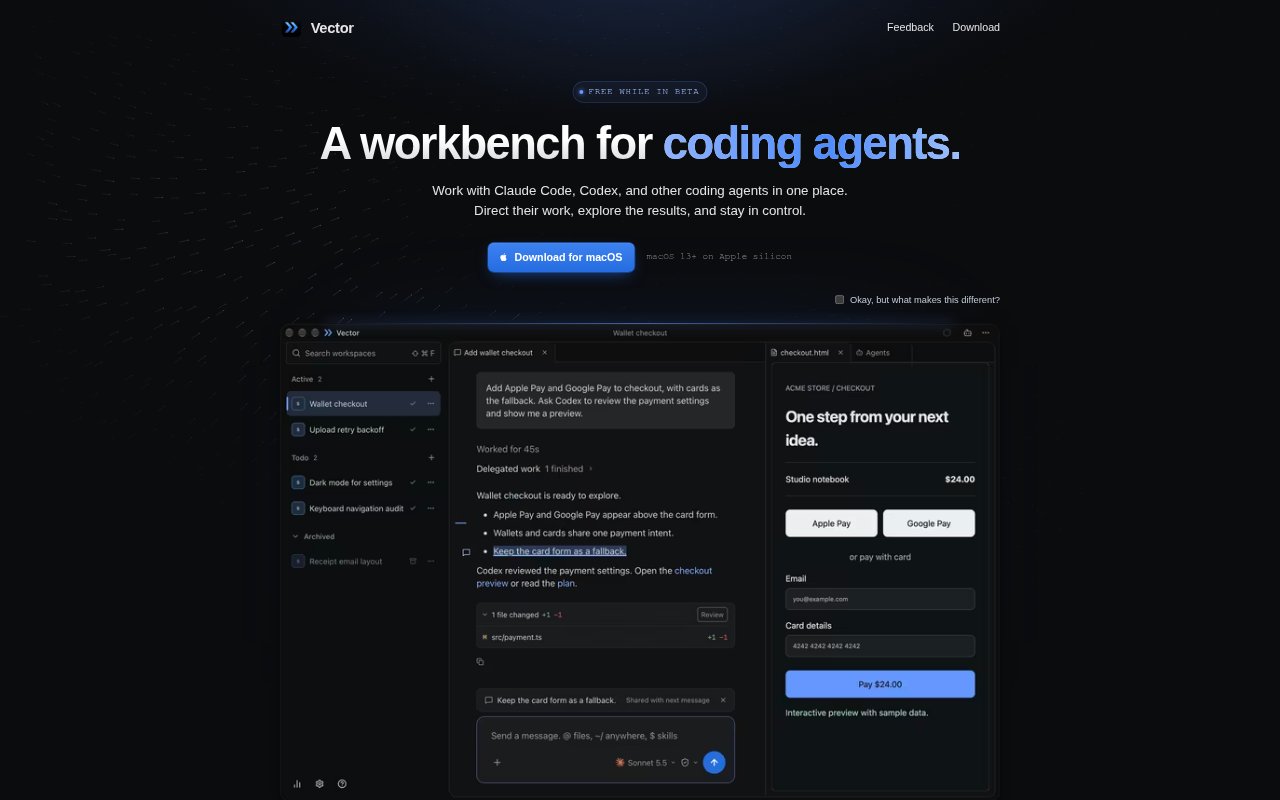
Vector is a workbench for directing and reviewing coding agents, including Claude, Codex, Cursor, and other agents. It brings agent conversations together with previews and diffs so developers can inspect the work while it is underway. Users can comment on specific lines of an agent’s output, open a separate conversation to investigate a question, and keep the original task in view. It works with supported agent command-line tools already installed and uses their existing accounts and configuration.
Vector Features:
Agent Workbench: Work with Claude, Codex, Cursor, and other coding agents in one place, directing their work and exploring the results.
Line Comments: Select a sentence in an agent’s output and attach a comment to that exact line to specify a change.
Side Conversations: Open a separate conversation to investigate a question while keeping the original task open beside it.
Preview Review: View a preview beside the agent’s explanation to inspect the result in context.
Diff Review: Keep code diffs beside the conversation to check the proposed changes against the agent’s explanation.
Existing CLI Setup: Use installed Claude, Codex, and Cursor command-line tools with their existing accounts, configuration, skills, and MCP servers.
Vector Benefits:
Clearer Feedback: Tying a request to the exact line makes it easier for an agent to identify which wording or decision needs attention.
Less Context Switching: Keeping the task and its related review material together helps developers follow work without repeatedly changing their focus.
Preserved Context: A separate investigation can happen without closing or replacing the conversation that holds the main task.
Earlier Checks: Inspecting a preview or diff as work progresses can help catch a mismatch before treating the result as complete.
Familiar Setup: Using existing agent accounts and configuration avoids having to set up a separate account or recreate those settings in Vector.
Use Cases:
Checkout Changes: Review a checkout update by viewing the running checkout beside the agent conversation and checking that existing form elements remain.
Wallet Payments: Investigate what happens when a customer cancels a wallet payment in a side conversation while keeping the checkout task open.
Output Corrections: Ask an agent to revise a particular sentence or decision by selecting that line and commenting directly beside it.
Code Change Review: Compare an agent’s explanation with its diff when deciding whether the proposed code changes match the task.
Parallel Questions: Explore a question that comes up during an agent task without losing the original conversation or its current focus.