

What is Whybook?
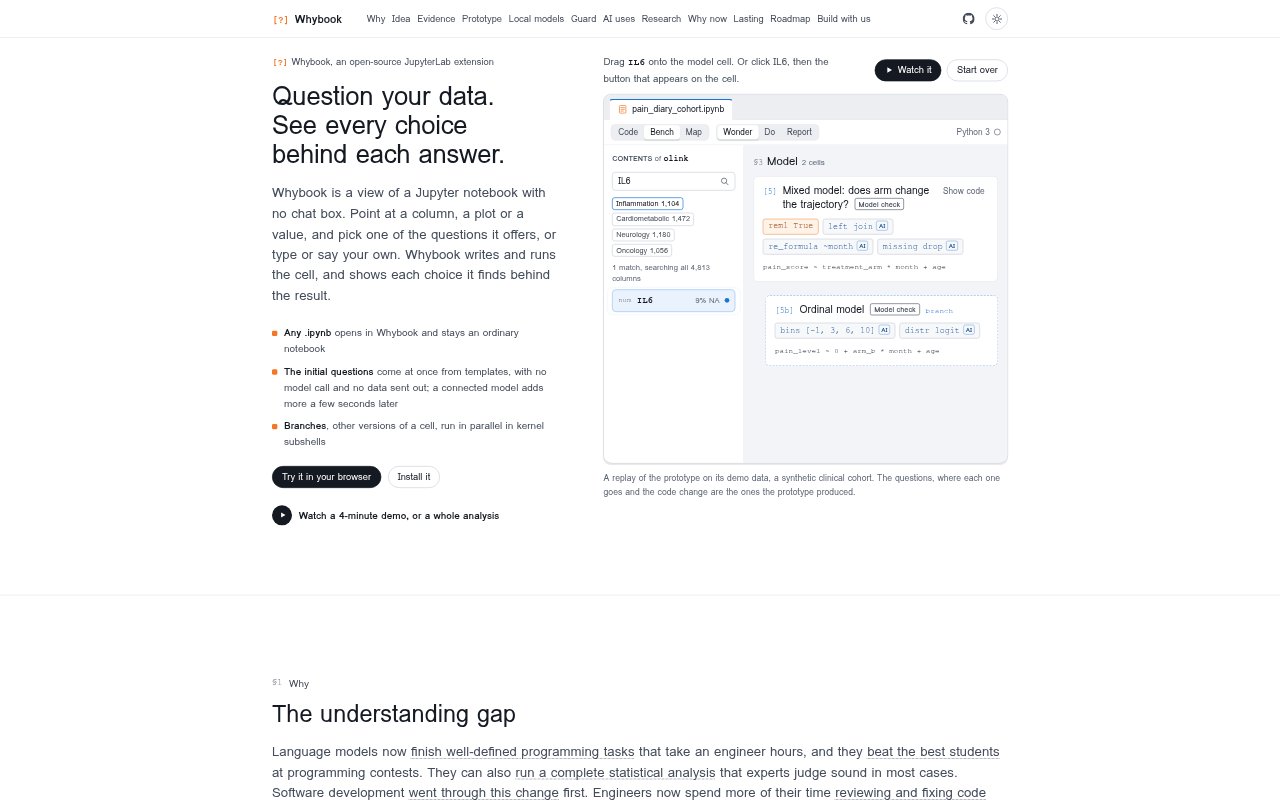
Whybook is an open-source JupyterLab extension for exploring data in notebooks. Instead of a chat box, it lets you point to a column, plot, or value, choose a suggested question, or ask one by typing or speaking. It writes and runs the notebook cell, then displays the choices behind the answer. Any .ipynb file can be opened in Whybook and remains an ordinary notebook, making it suited to analysts who want to explore data while keeping the work in Jupyter.
Whybook Features:
Data Questions: Select a column, plot, or value to see offered questions, or type or say a question of your own.
Cell Generation: Whybook writes and runs a notebook cell when you choose a question, without requiring a separate confirmation.
Visible Choices: The result includes the choices found behind the answer, such as where a variable lives and how it was joined.
Question Templates: Initial questions come from templates immediately, without a model call or sending data out.
Connected Model: Connecting a model adds more suggested questions after a short wait.
Parallel Branches: Create alternate cell versions or run branches in parallel in kernel subshells, with keyboard and drag actions for branching.
Whybook Benefits:
Clearer Analysis: Seeing the choices behind an answer gives analysts a way to inspect how the result was produced rather than relying on an unexplained conclusion.
Faster Exploration: Ready-made questions and generated cells reduce the setup involved in trying a new line of inquiry.
Private First Steps: Analysts can begin with template questions without a model call or sending their data out.
Comparable Alternatives: Parallel branches make it possible to examine different analysis paths without replacing the original cell.
Notebook Continuity: Keeping the work in an ordinary notebook makes the analysis easier to continue in the familiar Jupyter format.
Use Cases:
Explore a Column: Start investigating a dataset by selecting a column and choosing a suggested question about it.
Check an Association: Ask whether IL6 is associated with pain_score while adjusting for site, as in the product demonstration.
Compare Trajectories: Explore whether treatment arm changes a trajectory by creating a mixed-model question.
Test Mediation: Create a parallel branch to explore whether IL6 may mediate the effect of treatment_arm.
Refit a Model: Add a variable such as IL6 as a covariate and refit an existing model for comparison.