
What is cyberviber?
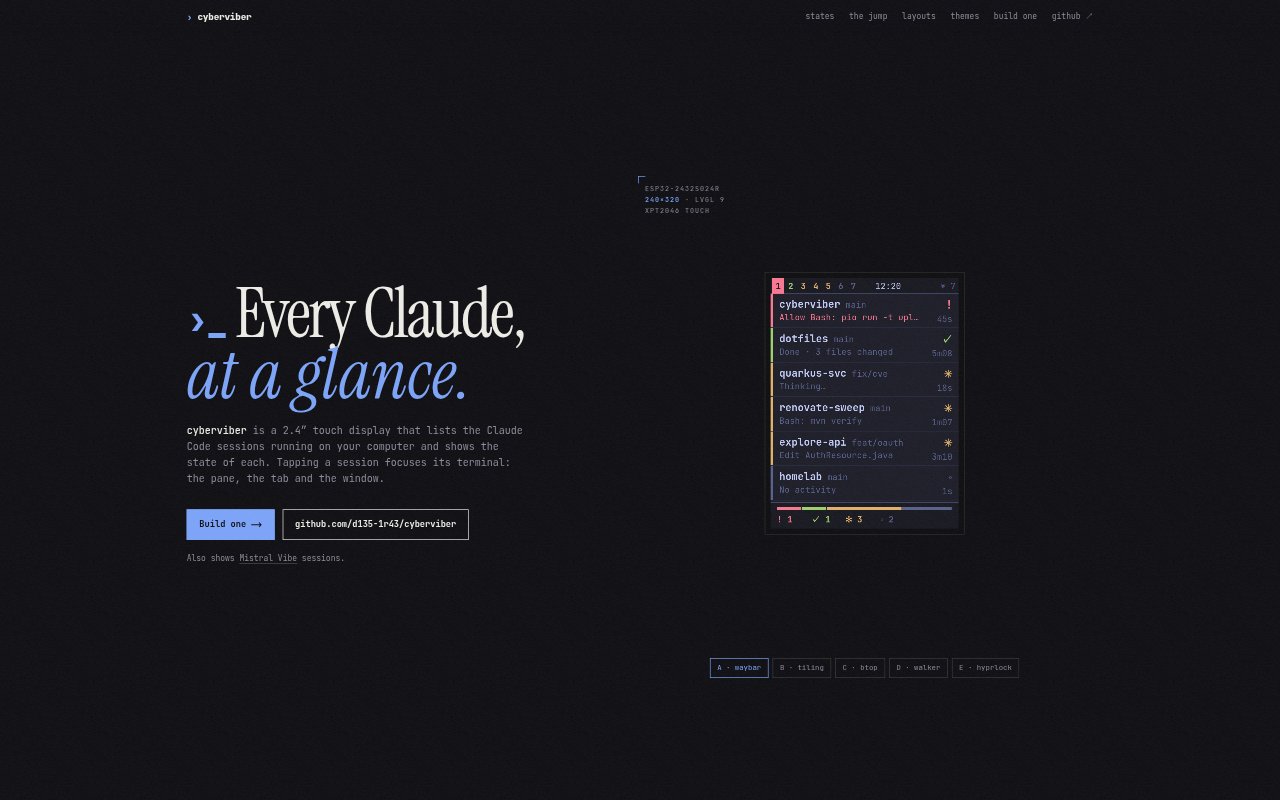
cyberviber is a small USB-connected touch display for people running Claude Code sessions on a computer. It shows each session’s state and lets you tap a session to bring its terminal pane, tab, or window into focus. The display can also show Mistral Vibe sessions, making it a compact desk monitor for keeping track of coding agents without relying on Wi-Fi.
cyberviber Features:
Session Overview: A 2.4-inch ESP32 touch display lists running Claude Code sessions and shows whether each is working, waiting for input, finished, or idle.
Urgency Sorting: Sessions that need attention appear first, and permission prompts or questions can make the display blink and wake its backlight.
Terminal Focus: Tapping a session sends a command back over USB to focus its multiplexer pane, terminal tab, or terminal window.
Activity Details: For Claude Code, the display can show the current activity step, context usage, an idle timer, and a process check.
Mistral Vibe Support: Mistral Vibe sessions appear alongside Claude Code, though permission prompts do not show as needs-you alerts and context usage is unavailable.
Display Options: The screen renders at 240 by 320 pixels and offers five layouts and eleven themes, with layout switching on the device.
USB Operation: One cable carries power and data, and the device does not use Wi-Fi; the computer daemon detects the USB port.
cyberviber Benefits:
Fewer Context Switches: Seeing session states together helps you spot which coding task needs attention without checking each terminal one by one.
Faster Responses: Attention-first ordering and visible prompts help you notice when a session is waiting for a decision or answer.
Direct Return: Tapping the relevant session takes you back to its terminal location, avoiding a manual search through panes, tabs, and windows.
Desk Visibility: A separate physical display keeps agent activity visible while your main screen is occupied by code, documents, or other work.
Local Connection: USB power and data provide a wired setup without depending on a Wi-Fi connection for the session display.
Use Cases:
Multiple Claude Sessions: Keep track of several Claude Code tasks running in different terminal panes or windows and identify which one has finished or needs input.
Permission Prompts: Use the display as an attention cue when Claude Code pauses for permission, then tap the session to return to its terminal.
Mixed Coding Agents: View Mistral Vibe and Claude Code sessions in the same list while switching between work handled by the two coding agents.
Terminal Workflows: Bring a session forward when working with supported terminal apps or multiplexer panes on macOS or Linux with Hyprland.
Desk Status Display: Build a dedicated status screen from the specified ESP32-2432S024R board, flash the firmware, and keep coding-session activity in view.