
What is Minute?
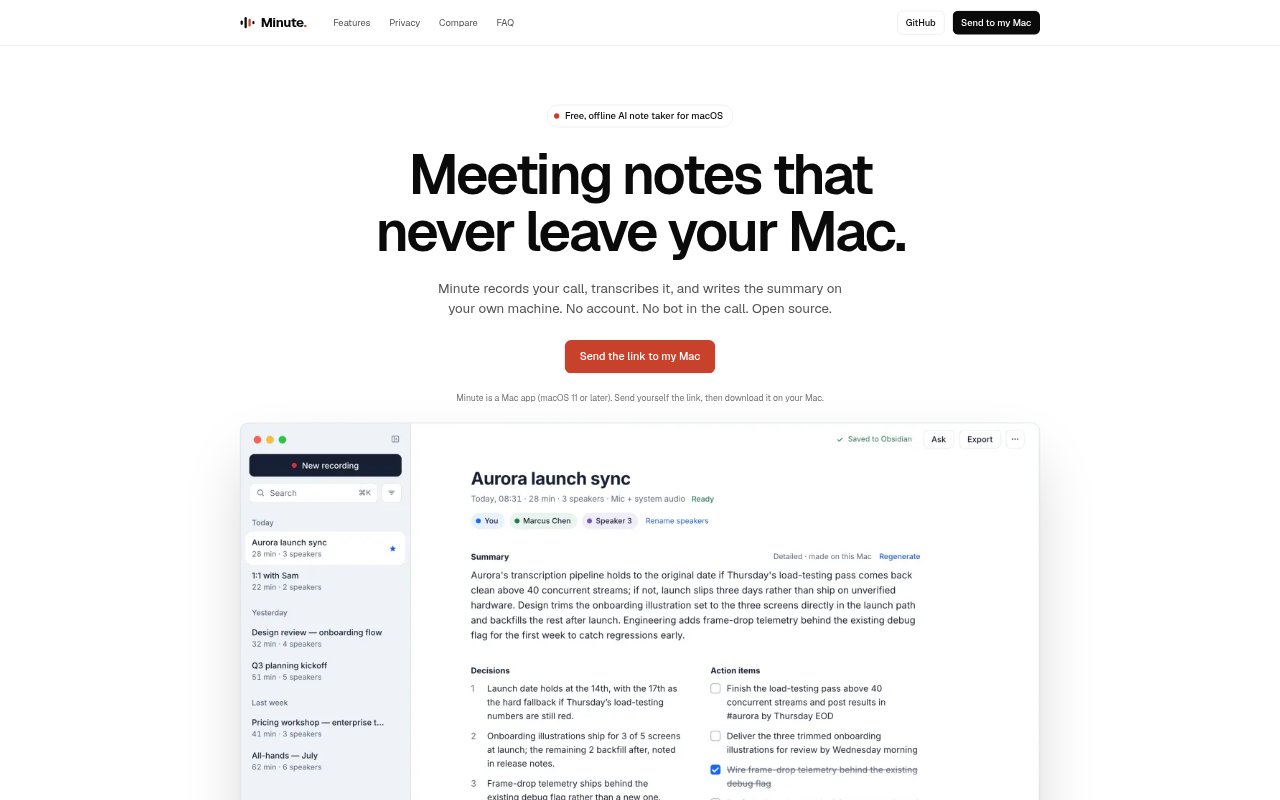
Minute is an offline AI meeting note taker for macOS that records calls, transcribes conversations, and produces summaries on your Mac. It is designed for people who want meeting notes without a bot joining their call or sending audio and notes to a cloud service. Minute works with common call apps, including Zoom, Teams, Meet, Slack, FaceTime, Webex, and Discord. It is free, open source, and requires no account.
Minute Features:
Local Recording: Minute records your microphone and, on macOS 13 or later with permission, system audio so it can capture the other people on a call.
Live Transcription: Whisper transcribes the conversation on your Mac as people speak, and timestamps let you play back the corresponding moment.
Speaker Labels: Minute identifies who said what and can remember voices you name, making it easier to follow speakers across a conversation.
Meeting Summaries: After a call, a local language model creates notes that include the summary, decisions, and action items.
Timestamped Questions: Ask a question about a meeting and Minute returns an answer with a citation to the moment in the recording.
Call Detection: Minute can offer to start recording when a supported meeting begins and stop when it ends; detection is off by default.
Markdown Export: Export any note as Markdown or have summaries saved to an Obsidian vault, with optional date, title, duration, and speaker properties.
Minute Benefits:
Private Meeting Notes: Keeping audio, transcripts, and summaries on your Mac reduces the need to entrust sensitive meeting content to an online note service.
Uninterrupted Calls: Because Minute does not join as a participant, meeting attendees do not see a note-taking bot or need to admit one.
Faster Follow-Through: Having decisions and action items ready when a call ends helps you move from discussion to next steps without writing notes from scratch.
Easy Recall: Speaker labels, transcript timestamps, and cited answers make it simpler to check who said something and revisit the relevant audio.
No Subscription Cost: The free app has no account or trial requirement, so individuals can try local meeting notes without adding a recurring plan.
Use Cases:
Client Calls: Capture project discussions in Zoom, Meet, Teams, or another supported app and review the decisions and follow-up tasks afterward.
Team Meetings: Use speaker labels and a live transcript to track contributions during planning sessions, then refer back to the summary after the call.
Interview Records: Record an interview locally, use timestamps to revisit specific answers, and ask questions to locate relevant parts of the conversation.
Personal Meeting Archive: Save summaries as Markdown files or into an Obsidian vault to keep meeting notes alongside other personal or project documentation.
Offline Work: Transcribe and summarize meetings without Wi-Fi after downloading the models, useful when you prefer to keep the workflow disconnected.